 Firefox Clippings Alternative← klackey.com
Take your Firefox Clippings
library beyond the browser.
Import your reusable clippings into a desktop app where they become part of a wider workflow: organized, searchable, and available across your supported apps, not just inside the browser. Klackey isn’t limited to Clippings, either: it’s built to bring in reusable text from almost anywhere, including exports from TextExpander, Ditto, ClipClip, Obsidian, and Apple Notes.
Digitally signed for Windows and macOS. This is pre-release software. Your feedback will help us prepare Klackey for its public launch.
Klackey started when a support system
blocked Firefox Clippings.
Klackey’s founder relied on Firefox Clippings every day for support replies, until their employer’s support-system migration blocked the extension, believed at the time to be over browser performance. That gap in the workflow became Klackey.
Bring in your clippings.
Keep the folders they’re already in.
Import your Firefox Clippings backup (clippings.json) and Klackey turns it into editable clippings, with folder structure preserved and eligible single-character Clippings shortcut keys converted into ;x abbreviations when that abbreviation is available; existing Klackey abbreviations are never overwritten. Import adds to what you already have and never overwrites anything, or check “Import into a new folder” and name it yourself to keep the whole library separate from your existing clippings.
 Your KlackeyEditable clippings, same folders, ready to format
Bring formatted responses
into your wider desktop workflow.
Reusable support replies often need more than plain text. Klackey imports the content as editable text, preserving paragraphs and line breaks. Once imported, you can add rich formatting while Klackey maintains a plain-text version for compatibility, and frequently reused responses can become text-expansion shortcuts too.
Rebuild or extend
changing fields as Dynamic Snippets.
Clippings’ own fill-in placeholders don’t carry over automatically today, so recreate the ones you use as a Dynamic Snippet after importing: turn Hello {{fill:Customer Name}}, thank you for contacting us about {{fill:Issue}}. into a snippet that pauses to collect the changing details before pasting the finished reply.
Not just inside
the browser anymore.
Clippings operates within the Firefox and Thunderbird extension environments. Klackey is a desktop app, so your imported clippings and abbreviations are available across supported applications on Windows and macOS, email clients, support tools, documents, and browsers included, through the same global quick-paste shortcut and text expansion.
Migrating from a different tool?
Klackey isn’t picky about where from.
Firefox Clippings is a free extension. It’s useful, but far from the only place reusable text ends up. Klackey is built as a general import destination, not a Clippings-only tool:
- ✓Firefox Clippings backup: the
clippings.jsonfile itself, with folder structure carried over and eligible single-character shortcut keys converted to;xabbreviations when available. - ✓CSV export: from TextExpander, Ditto, ClipClip, a spreadsheet, or any tool that can export a table. Column names don’t need to match; Klackey is deliberately permissive about how they’re labeled.
- ✓A folder of files: Markdown, plain text, RTF, or HTML, including exports from Obsidian or Apple Notes.
- ✓Microsoft OneNote: import .onepkg or .one files directly (Windows only).
- ✓Klackey’s own backups: moving to a new computer, or restoring from an export a teammate shared with you.
Export your folders.
Share them with a teammate.
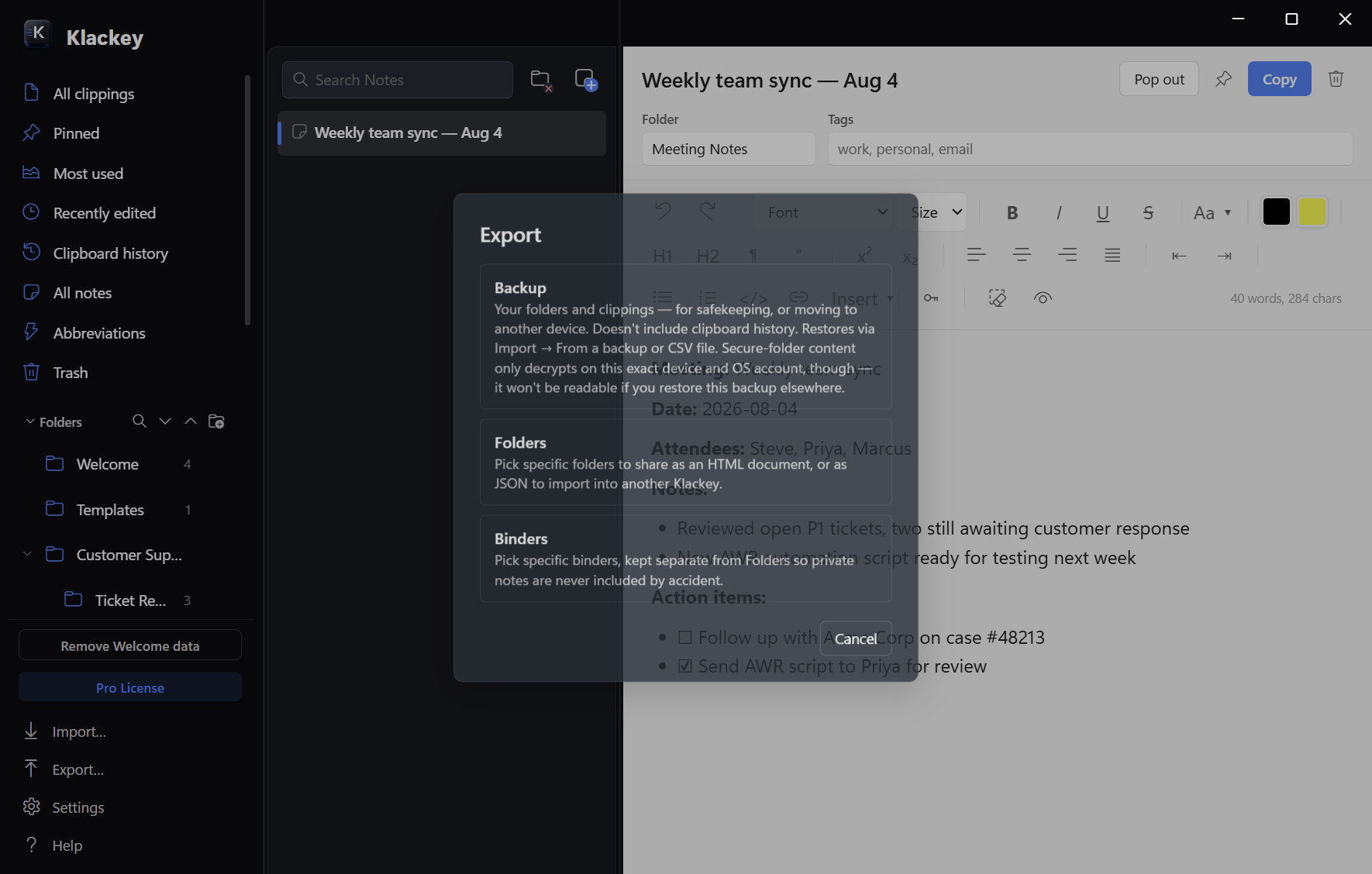
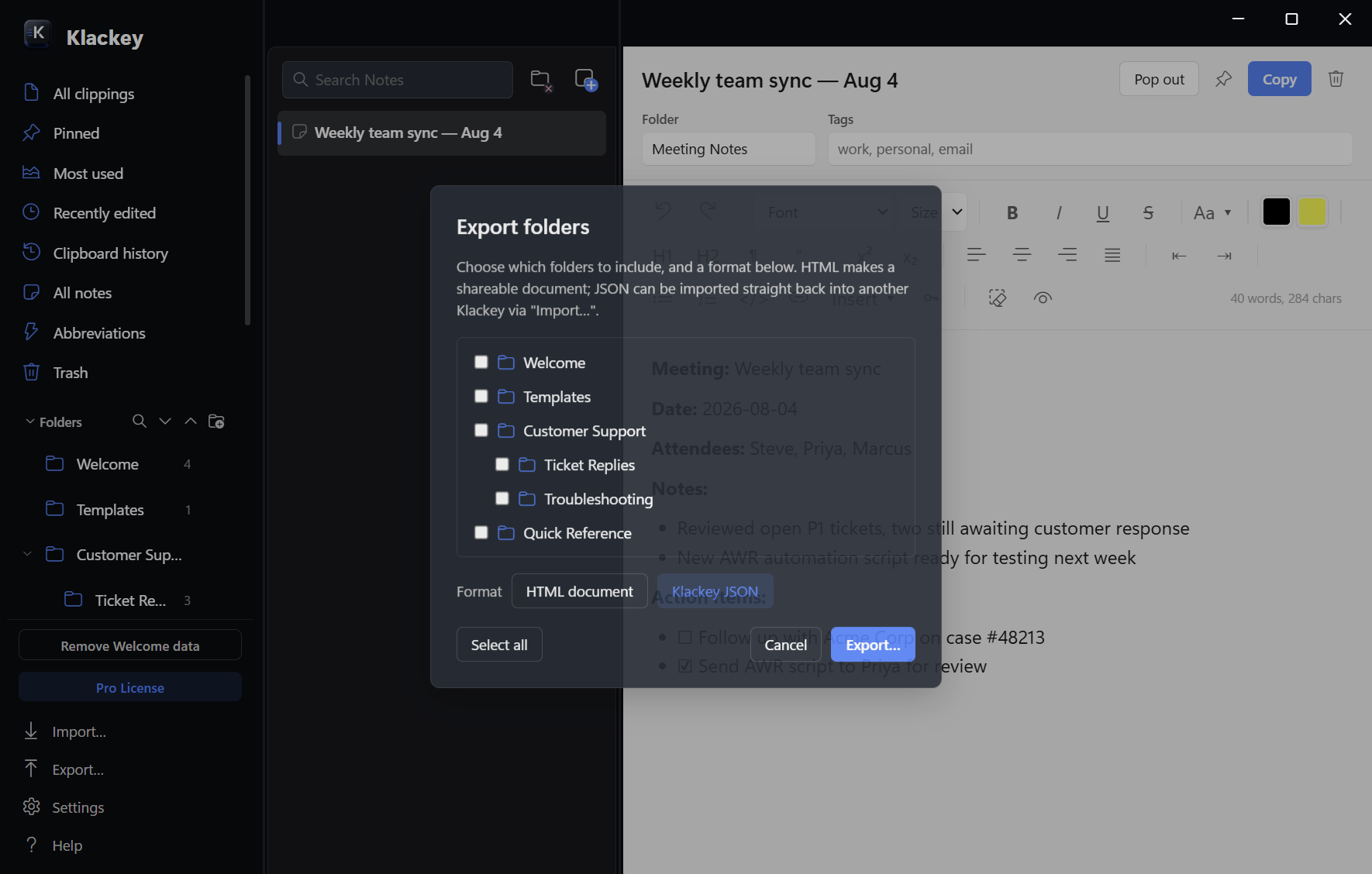
Migrating in isn’t the only direction. Check off as many folders or binders as you want, not just one, and export the selection in either format: JSON, which a teammate imports straight back into their own Klackey, or HTML, a shareable read-only document for anyone who doesn’t use Klackey. On import, they choose their own name for the new folder it lands in, so it never has to collide with or overwrite anything they already have. The Secure Folder is never included in either export, so there’s no risk of sharing something sensitive by accident.
Good to know.
Can Klackey import my Firefox Clippings backup?+
Yes. Import… in the sidebar footer → a single backup or CSV file, then point it at your exported clippings.json. It's a one-time import, not a live sync, so it adds a snapshot of your library rather than staying connected to Clippings.
Will importing preserve my Clippings folders?+
Yes. Your folder structure carries over exactly. You can merge it straight into your existing Klackey folders, or check “Import into a new folder” and name it yourself to keep the import separate.
What happens to Clippings shortcut keys and placeholders?+
Eligible single-character Clippings shortcut keys become ;x abbreviations when that abbreviation is available; existing Klackey abbreviations are never overwritten. Clippings' own fill-in placeholders don't convert automatically today, so recreate any you use as a Klackey Dynamic Snippet after importing.
Can I use imported clippings outside Firefox?+
Yes. Klackey is a desktop app, not a browser extension, so imported clippings and their abbreviations are available across supported applications on your computer, through the same global quick-paste shortcut and text expansion.
Does importing overwrite anything already in Klackey?+
No. Import always adds to your existing library; it never overwrites or removes anything already there.
Is my imported library uploaded anywhere?+
No. Everything you import is stored locally on your computer. Klackey doesn't require an account, and nothing you import is uploaded anywhere.
Still have a question? Visit Klackey Support.
Klackey is not affiliated with Mozilla, Firefox, or AE Creations (the maker of Clippings). Firefox and Clippings are trademarks of their respective owners.
Bring your existing clippings
with you.
Install Klackey, import a copy of your library, and test the workflow free for 14 days.
No credit card required